3D Gaussian Splatting in Open3D#
Open3D supports real-time 3D Gaussian Splatting (3DGS) rendering through a GPU compute pipeline that projects, sorts, and composites Gaussian splats into a colour image alongside Filament-rendered triangle-mesh geometry — with correct per-splat depth occlusion.
Feature overview#
File I/O#
Format |
Read |
Write |
|---|---|---|
Gaussian PLY ( |
|
|
Binary SPLAT ( |
|
|
Compressed SPZ ( |
|
|
All formats are detected automatically from the file extension and content. Gaussian PLY files store log-scales and raw quaternions; binary SPLAT files store linear scales; and SPZ files use compressed log-scales and xyzw quaternions while preserving higher-order spherical harmonics. read_point_cloud normalises all formats into the same in-memory layout. Note that SPLAT files do not contain higher order spherical harmonics and so do not support view dependent appearance.
Geometric transforms#
Use PointCloud.Scale / Rotate / Translate for splats — not Transform(4×4). A general affine matrix cannot update the Gaussian covariance consistently. Only isotropic scaling, rotation, and translation are fully supported:
Operation |
Positions |
Quaternions |
Linear scales |
SH bands |
|---|---|---|---|---|
|
✓ shifted |
— |
— |
— |
|
✓ rotated |
✓ left-multiplied by \(q_R\) |
— |
✓ all degrees rotated (Ivanic–Ruedenberg) |
|
✓ scaled |
— |
✓ multiplied by |s| |
✓ odd-degree blocks negated if s < 0 |
|
✓ (warning) |
✗ unchanged |
✗ unchanged |
✗ unchanged |
Rotate is the most involved: it left-multiplies the stored unit quaternion and applies the matching SO(3) rotation to every degree of f_rest using the Ivanic–Ruedenberg (1996) recursive algorithm — including degree-3 coefficients — so view-dependent colour stays correct after any rotation.
Cropping#
PointCloud.Crop(AxisAlignedBoundingBox) removes splats outside the box. All attributes of retained splats are preserved unchanged.
Anti-aliasing (as in Mip Splatting)#
When a 3DGS scene was trained with anti-aliasing (e.g. the Mip Splatting variant), set
mat = o3d.visualization.rendering.MaterialRecord()
mat.shader = "gaussianSplat"
mat.gaussian_splat_antialias = True
This enables density compensation in the projection shader, multiplying each splat’s alpha by \(\sqrt{\det(\Sigma_{\text{orig}}) / \det(\Sigma_{\text{blurred}})}\) to cancel the brightness increase from the low-pass regulariser. Do not enable this for scenes trained without anti-aliasing, or they will appear too dark.
Offscreen rendering#
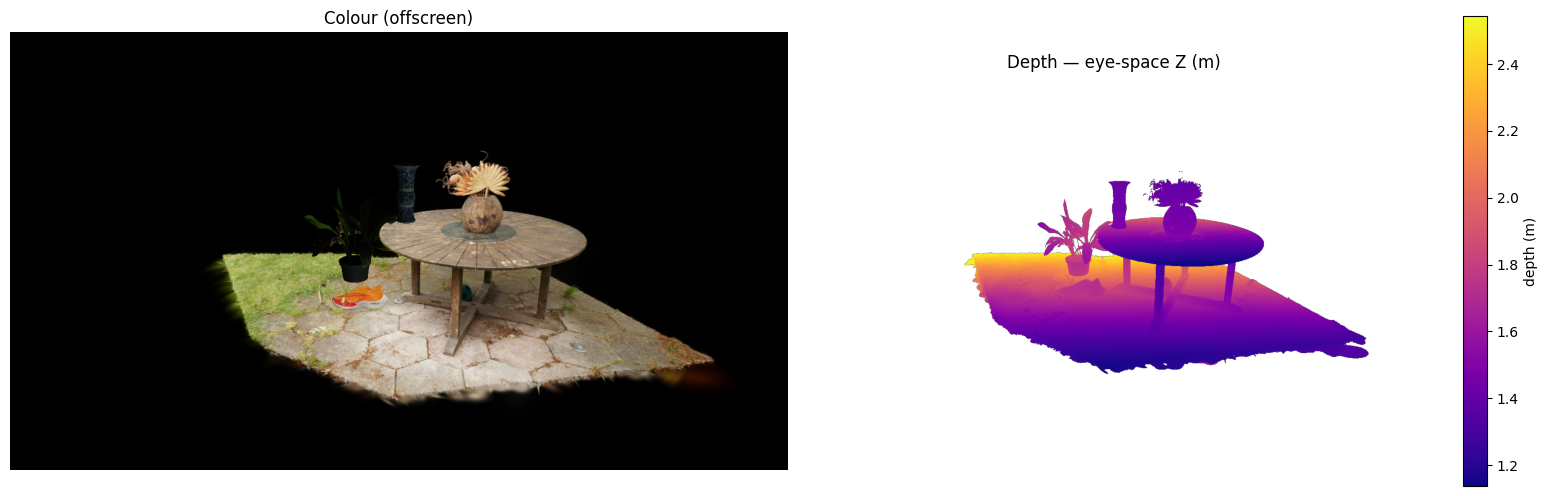
open3d.visualization.rendering.OffscreenRenderer renders the scene to CPU Image objects without opening a window, suitable for batch pipelines and automated screenshots. Both colour (render_to_image) and depth (render_to_depth_image) are supported.
This notebook demonstrates how to:
Download example assets (Gaussian PLY, binary SPLAT, compressed SPZ, and glTF meshes).
Detect geometry type with
open3d.io.read_file_geometry_typebefore loading.Load and inspect splat attributes from
.ply,.splat, and.spzformats.Apply Sim(3) transforms using
_apply_srt_geometry— identical code for splats and meshes.Mix Gaussian splat scenes with textured triangle meshes in one
open3d.visualization.drawwindow.Render the scene offscreen to a colour image and a depth image.
The helper functions defined here match draw_from_csv.py, which lets you load any mix of assets from a CSV manifest file from the command line.
Multi-GPU systems#
On Linux and Windows, select the Vulkan GPU before starting Python or Open3D. For example, to select Intel devices:
VK_LOADER_DRIVERS_SELECT='*intel*' python your_script.py

# To select a specific physical device "vendorID:deviceID" instead of a vendor's drivers:
VK_LOADER_DEVICE_SELECT='0x8086:0x56a1' python your_script.py
Replace *intel* with an appropriate Vulkan loader filter for another GPU.
[ ]:
from pathlib import Path
from typing import Tuple
import sys

import requests
import numpy as np
import open3d as o3d
#from open3d.visualization import draw       # Local use, separate Open3D window
from open3d.web_visualizer import draw      # Remote use, embedded Open3D window
Download example assets#
We fetch six assets that together form a mixed 3DGS + mesh scene:
File |
Type |
Description |
|---|---|---|
|
Gaussian PLY |
Outdoor garden scene (MipNeRF-360) |
|
glTF mesh |
Smithsonian ceramic vase |
|
glTF mesh |
Smithsonian orchid |
|
Binary SPLAT |
Nike shoe |
|
Compressed SPZ |
Niantic Labs horned lizard sample |
|
Compressed SPZ |
Niantic Labs racoon family sample |
Files are cached under Open3D’s data directory so repeated runs skip the download.
[ ]:
def _download_example_assets():
    """Download example assets and return the directory they were saved to."""
    asset_urls = {
        "mipnerf360_garden_crop_table.ply": (
            "https://github.com/isl-org/open3d_downloads/releases/download/"
            "3dgs-1/mipnerf360_garden_crop_table.ply"
        ),
        "vase-f1992_13_2-150k-4096.glb": (
            "https://3d-api.si.edu/content/document/"
            "3d_package:a05dc7c9-7b6f-43f8-8830-69fe98718e4f/"
            "resources/vase-f1992_13_2-150k-4096.glb"
        ),
        "Lycaste_virginalis-150k-4096_std.glb": (
            "https://3d-api.si.edu/content/document/"
            "3d_package:5ff6e90a-4ddb-4eea-a69c-40970f85fbcb/"
            "resources/Lycaste_virginalis-150k-4096_std.glb"
        ),
        "nike.splat": (
            "https://huggingface.co/cakewalk/splat-data/resolve/"
            "8fa962a5c7088fff3149a658718b89c5eb2c9c26/nike.splat?download=true"
        ),
        "hornedlizard.spz": (
            "https://raw.githubusercontent.com/nianticlabs/spz/main/"
            "samples/hornedlizard.spz"
        ),
        "racoonfamily.spz": (
            "https://raw.githubusercontent.com/nianticlabs/spz/main/"
            "samples/racoonfamily.spz"
        ),
    }
    dataset = o3d.data.Dataset("3dgs_example_assets")
    out_path = Path(dataset.download_dir)
    out_path.mkdir(parents=True, exist_ok=True)
    CHUNK = 64 * 1024 * 1024  # 64 MB
    for name, url in asset_urls.items():
        dest = out_path / name
        if dest.is_file():
            print(f"  {name}: already present")
            continue
        r = requests.get(url, stream=True, timeout=30)
        r.raise_for_status()
        print(f"  Downloading {name}", end="", flush=True)
        with open(dest, "wb") as fh:
            for chunk in r.iter_content(chunk_size=CHUNK):
                if chunk:
                    fh.write(chunk)
                    print(".", end="", flush=True)
        print(" done")
    return out_path


asset_dir = _download_example_assets()
print(f"\nAssets saved to: {asset_dir}")
Loading 3DGS files — format overview#
Before reading, open3d.io.read_file_geometry_type returns a bitmask describing what a file contains. This lets one loader handle any asset type:
Flag |
Meaning |
|---|---|
|
Gaussian splat data ( |
|
Triangle mesh ( |
|
Generic point cloud |
|
Line set only |
All three formats are read with o3d.t.io.read_point_cloud into an open3d.t.geometry.PointCloud. Gaussian PLY files store log-scales (exponentiated at load time), binary SPLAT files store linear scales, and SPZ files use compressed log-scales plus xyzw quaternions. Once loaded, all three use the same in-memory layout.
[ ]:
ply_path = asset_dir / "mipnerf360_garden_crop_table.ply"
splat_path = asset_dir / "nike.splat"
spz_paths = [asset_dir / "hornedlizard.spz", asset_dir / "racoonfamily.spz"]
glb_paths = [asset_dir / "vase-f1992_13_2-150k-4096.glb", asset_dir / "Lycaste_virginalis-150k-4096_std.glb"]

# Show the geometry-type flags for each file
for path in [ply_path, splat_path, *spz_paths, *glb_paths]:
    gtype = o3d.io.read_file_geometry_type(str(path))
    flags = []
    if gtype & o3d.io.CONTAINS_GAUSSIAN_SPLATS: flags.append("GAUSSIAN_SPLATS")
    if gtype & o3d.io.CONTAINS_TRIANGLES:       flags.append("TRIANGLES")
    if gtype & o3d.io.CONTAINS_POINTS:          flags.append("POINTS")
    if gtype & o3d.io.CONTAINS_LINES:           flags.append("LINES")
    print(f"{path.name:50s}  flags: {' | '.join(flags) or hex(gtype)}")
Inspecting Gaussian attributes#
Tensor IO loads .splat / Gaussian .ply into open3d.t.geometry.PointCloud. Printing the object summarises the point count and all attribute tensors.
Each splat stores:
Attribute |
Shape |
Description |
|---|---|---|
|
|
Splat centre in world space |
|
|
Unit quaternion |
|
|
Linear-space scale |
|
|
Sigmoid-mapped opacity in |
|
|
Degree-0 spherical harmonic (DC colour) per RGB channel |
|
|
Higher-degree SH coefficients; |
Use PointCloud.Scale / Rotate / Translate to move splats: these operations update rot, scale, and f_rest so the rendered appearance stays correct. Transform(4×4) is not supported for splats — see the transforms section above.
[ ]:
# Load and inspect the Gaussian PLY scene
pcd_ply = o3d.t.io.read_point_cloud(str(ply_path))
print(f'=== {ply_path.name} ===')
print(pcd_ply)

print()

# Load and inspect the binary SPLAT file — same attributes, different on-disk encoding
pcd_splat = o3d.t.io.read_point_cloud(str(splat_path))
print(f'=== {splat_path.name} ===')
print(pcd_splat)

# Load and inspect the compressed SPZ samples from Niantic Labs
pcd_spz = {}
for path in spz_paths:
    pcd_spz[path.stem] = o3d.t.io.read_point_cloud(str(path))
    print()
    print(f'=== {path.name} ===')
    print(pcd_spz[path.stem])
Sim(3) (Scale → Rotate → Translate) transforms#
For Gaussian splat PointClouds, Sim(3) transforms must be applied as three separate operations in Scale → Rotate → Translate order rather than with a single 4×4 matrix:
scale(s, center)— multiplies all splatscaleattributes by|s|; for a negativesit also negates the odd-degree SH blocks (point inversion).rotate(R, center)— left-multiplies stored quaternions byq_R; applies the SO(3) rotation tof_rest(Ivanic–Ruedenberg algorithm) so view-dependent colour stays correct.translate(t)— shiftspositionsonly; rotations, scales, and SH are untouched.
The helper below accepts (scale, rx_deg, ry_deg, rz_deg, tx, ty, tz) and works identically for t.geometry.PointCloud (Gaussian splats), t.geometry.TriangleMesh, legacy geometry.TriangleMesh, and geometry.PointCloud — all expose the same SRT API.
[ ]:
def _apply_srt_geometry(
    geometry,
    srt: Tuple[float, float, float, float, float, float, float],
) -> None:
    """Apply Scale->Rotate->Translate to any Open3D geometry in-place.

    Parameters
    ----------
    geometry:
        Any geometry that exposes .scale(), .rotate(), .translate():
        t.geometry.PointCloud (Gaussian splats), t.geometry.TriangleMesh,
        legacy geometry.TriangleMesh, or geometry.PointCloud.
    srt:
        (scale, rx_deg, ry_deg, rz_deg, tx, ty, tz)
        Euler angles are XYZ order in degrees; translation is applied after rotation.
    """
    scale, rx, ry, rz, tx, ty, tz = srt
    rotation = np.array(
        o3d.geometry.get_rotation_matrix_from_xyz(
            np.deg2rad(np.array([rx, ry, rz], dtype=np.float64))
        )
    )
    translation = np.array([tx, ty, tz], dtype=np.float64)
    center = np.zeros(3, dtype=np.float64)
    geometry.scale(float(scale), center)
    geometry.rotate(rotation, center)
    geometry.translate(translation)
Loading different geometry types#
_load_and_transform_row uses the geometry-type bitmask to choose the right reader and material, then immediately applies the SRT transform:
Gaussian splats →
o3d.t.io.read_point_cloud+shader = "gaussianSplat"material.Triangle meshes →
o3d.io.read_triangle_model, which supports multi-material glTF / OBJ / FBX. SRT is applied to each sub-mesh inside the model.Point clouds →
o3d.io.read_point_cloudwith default material.
Because the same _apply_srt_geometry call handles all three cases, you never need to remember which API to use — the geometry-type flag does the dispatching.
[ ]:
def _load_and_transform_row(
    path: Path,
    srt: Tuple[float, float, float, float, float, float, float],
):
    """Load a geometry file and return a list of draw() dicts.

    Returns a list (one entry per geometry) ready to pass to
    o3d.visualization.draw, or None if the file is unsupported / missing.
    """
    if not path.is_file():
        print(f"[warning] File not found: {path}. Skipping.", file=sys.stderr)
        return None

    gtype = o3d.io.read_file_geometry_type(str(path))

    if gtype & o3d.io.CONTAINS_GAUSSIAN_SPLATS:
        # Gaussian splat — tensor PointCloud with gaussianSplat shader
        t_pcd = o3d.t.io.read_point_cloud(str(path))
        _apply_srt_geometry(t_pcd, srt)
        mat = o3d.visualization.rendering.MaterialRecord()
        mat.shader = "gaussianSplat"
        return [{"name": path.stem, "geometry": t_pcd, "material": mat}]

    if gtype & o3d.io.CONTAINS_TRIANGLES:
        # Multi-material model (glTF / OBJ / FBX); SRT applied to every sub-mesh
        model = o3d.io.read_triangle_model(str(path))
        for mesh_info in model.meshes:
            _apply_srt_geometry(mesh_info.mesh, srt)
        return [{"name": path.stem, "geometry": model}]

    if gtype & o3d.io.CONTAINS_POINTS:
        pcd = o3d.io.read_point_cloud(str(path))
        _apply_srt_geometry(pcd, srt)
        return [{"name": path.stem, "geometry": pcd}]

    print(f"[info] Skipping unsupported geometry type {gtype!r}: {path}", file=sys.stderr)
    return None
Anti-aliasing (density compensation)#
The gaussianSplat shader always adds a \(0.3 I_{2\times2}\) low-pass filter to every projected covariance to ensure sub-pixel splats cover at least one pixel. This slightly brightens the scene.
If the 3DGS scene was trained with anti-aliasing (e.g. the Mip-Splatting variant), enable density compensation to cancel the brightness increase:
mat.gaussian_splat_antialias = True
This multiplies each splat’s alpha by \(\sqrt{\det(\Sigma_{\text{orig}}) / \det(\Sigma_{\text{blurred}})}\) in the projection shader. Only enable this for scenes that were trained with anti-aliasing — enabling it for standard scenes makes them appear too dark.
Draw the full mixed scene#
The manifest below places the garden Gaussian scene as a backdrop, two glTF mesh models on the table (flipped 180° in X so they stand upright in the scene’s Y-up coordinate system), the Nike shoe splat, and both Niantic Labs SPZ sample splats in the scene.
o3d.visualization.draw accepts a list of dicts with "name", "geometry", and optionally "material" keys. Gaussian splat entries must use shader = "gaussianSplat".
[ ]:
# Scene manifest: (filename, scale, rx_deg, ry_deg, rz_deg, tx, ty, tz)
# Mirrors the CSV used by draw_from_csv.py
manifest = [
    ("mipnerf360_garden_crop_table.ply",       1.0,   0, 0, 0,  0.000, 0.000, 0.0),
    ("vase-f1992_13_2-150k-4096.glb",          0.5, 180, 0, 0, -0.200, 0.200, 1.0),
    ("Lycaste_virginalis-150k-4096_std.glb",   0.75, 180, 0, 0,  0.000, 0.425, 0.8),
    ("nike.splat",                             0.075, -15, 0, 0,  0.000, 0.470, 1.0),
]

draw_list = []
for i, (filename, *srt_values) in enumerate(manifest):
    path = asset_dir / filename
    srt = tuple(srt_values)
    out = _load_and_transform_row(path, srt)
    if not out:
        continue
    for d in out:
        d["name"] = f"l{i + 1}_{path.stem}"
    draw_list.extend(out)

print(f"Loaded {len(draw_list)} geometry entr{'y' if len(draw_list) == 1 else 'ies'}:")
for d in draw_list:
    print(f"  {d['name']}")

draw(
    draw_list,
    show_ui=True,
    title="3DGS + mesh scene",
    show_skybox=False,
    bg_color=(0.0, 0.0, 0.0, 1.0),
    ibl_intensity=100000,
)
# optionally, draw the hornedlizard.spz and racoonfamily.spz scenes
Offscreen rendering — colour and depth images#
open3d.visualization.rendering.OffscreenRenderer renders the same scene to CPU Image objects without opening a window. This is useful for automated pipelines, batch processing, and documentation screenshots.
``render_to_image()`` returns an
open3d.geometry.Image(RGB, uint8).``render_to_depth_image(z_in_view_space=True)`` returns a float32 depth image in linear eye-space depth (metres). With
z_in_view_space=False(default) you get normalised device depth.
Both methods support Gaussian splat geometry through the same gaussianSplat material and produce depth values that account for per-splat occlusion against any triangle mesh geometry in the scene.
[ ]:
import matplotlib.pyplot as plt

WIDTH, HEIGHT = 1280, 720
renderer = o3d.visualization.rendering.OffscreenRenderer(WIDTH, HEIGHT)
renderer.scene.set_background([0.0, 0.0, 0.0, 1.0])

# Add all geometries from draw_list to the offscreen scene
for entry in draw_list:
    name = entry['name']
    geom = entry['geometry']
    mat  = entry.get('material', o3d.visualization.rendering.MaterialRecord())
    if isinstance(geom, o3d.visualization.rendering.TriangleMeshModel):
        renderer.scene.add_model(name, geom)
    else:
        renderer.scene.add_geometry(name, geom, mat)

# Position the camera to look at the centre of the scene from a sensible distance.
# setup_camera(fov_deg, center, eye, up) — eye is the camera position in world space.
bounds = renderer.scene.bounding_box
center = bounds.get_center()
extent = np.linalg.norm(bounds.get_max_bound() - bounds.get_min_bound())
eye    = center + np.array([0.0, -extent * 0.2, extent * 0.6])  # step back along +Z
renderer.setup_camera(60.0, center.tolist(), eye.tolist(), [0.0, -1.0, 0.0])

# Render colour image
colour_img = renderer.render_to_image()
colour_arr = np.asarray(colour_img)

# Render depth image (linear eye-space metres)
depth_img = renderer.render_to_depth_image(z_in_view_space=True)
depth_arr = np.asarray(depth_img)

# Clip to finite, positive depth values for display
valid = depth_arr[np.isfinite(depth_arr) & (depth_arr > 0)]
d_min, d_max = (valid.min(), valid.max()) if valid.size else (0.0, 1.0)

# Display inline with matplotlib
fig, axes = plt.subplots(1, 2, figsize=(16, 5))
axes[0].imshow(colour_arr)
axes[0].set_title("Colour (offscreen)")
axes[0].axis("off")

im = axes[1].imshow(depth_arr, cmap="plasma", vmin=d_min, vmax=d_max)
fig.colorbar(im, ax=axes[1], label="depth (m)")
axes[1].set_title("Depth — eye-space Z (m)")
axes[1].axis("off")

plt.tight_layout()
plt.show()